Where
POS → Cash Drawers
REGISTER TOTAL is what Rundoo expects right now.

Getting Started with Rundoo · Transactions
Log petty cash and close out the till at the end of the day.
At the end of a long day, the last thing you want is a long process to close out the till. You just want to count your cash, lock the doors, and head home. Rundoo keeps the running count for you all day, so closing out is really just confirming what it already knows. Do it every day and your books stay clean without you thinking about it.
In POS mode, open the Cash Drawers tab on the left. That is your home base for the till. Up in the top-left you'll see the REGISTER TOTAL, the running cash balance Rundoo expects in the drawer right now, based on today's sales, refunds, and petty-cash moves. The two buttons you'll reach for most, Close out and Petty cash, sit in the top-right, next to Print today's summary.
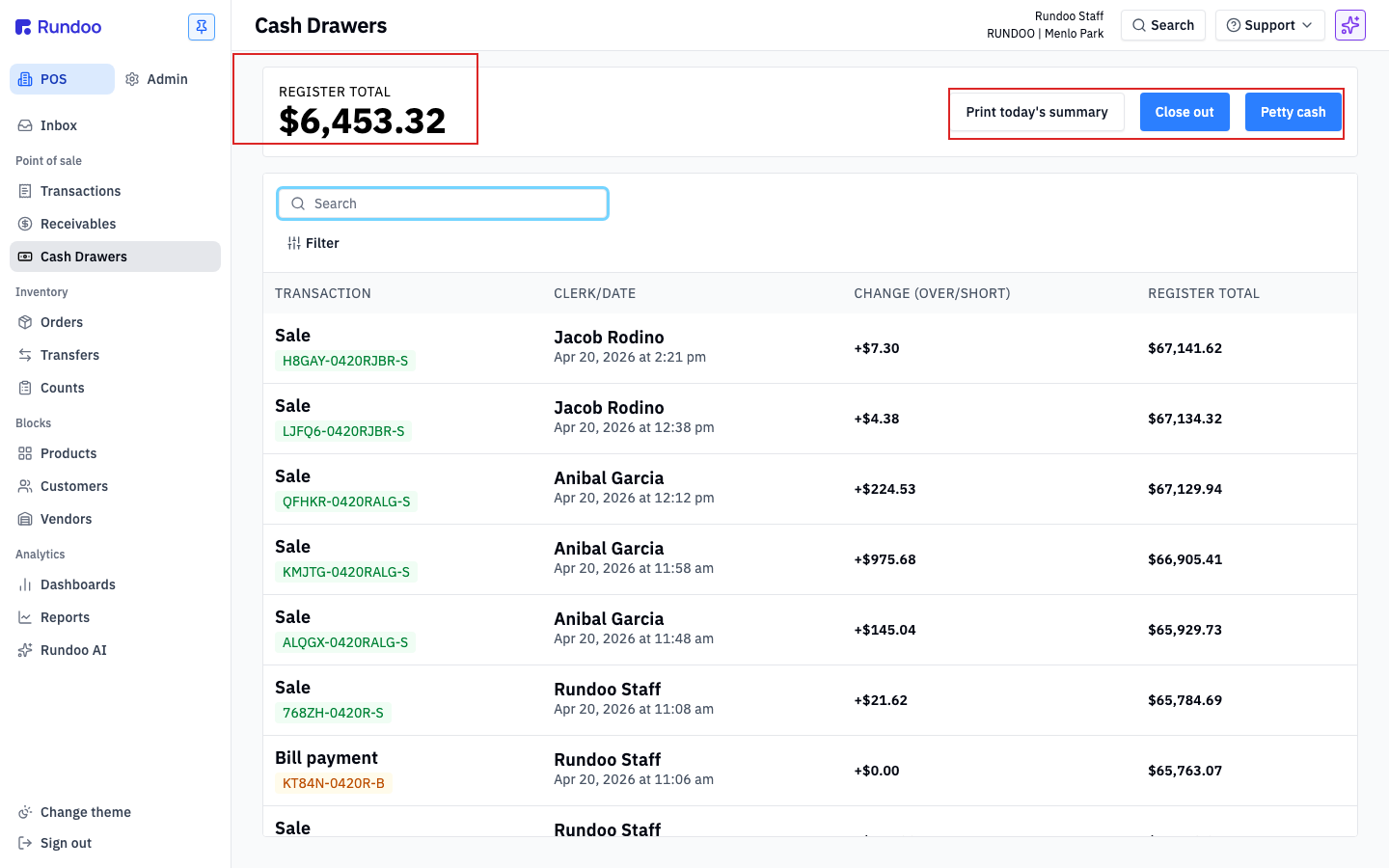
Your REGISTER TOTAL starts each day from your Float, the standard cash you leave in the drawer overnight. Setting that float is a one-time job covered in the Set Your Starting Cash video. Here we're picking up from a day already underway.
Petty cash is any cash that leaves or enters the drawer without a sale attached: pulling $20 for the crew's lunch, reimbursing a delivery tip, or dropping in extra change. If you just grab the bills, the drawer comes up short at close and nobody can say why. So you log it, and Rundoo keeps the count honest.
Click Petty cash in the top-right. A small window opens with three fields.
Type the dollar figure in Amount. Leave Withdraw selected when cash is coming out (the default), or switch to Deposit when you're adding cash in.
The Note field is your paper trail, so be specific. "Lunch, Menlo Diner" tells the story later; "food" does not. That note shows up in your past sessions and on the end-of-day summary.
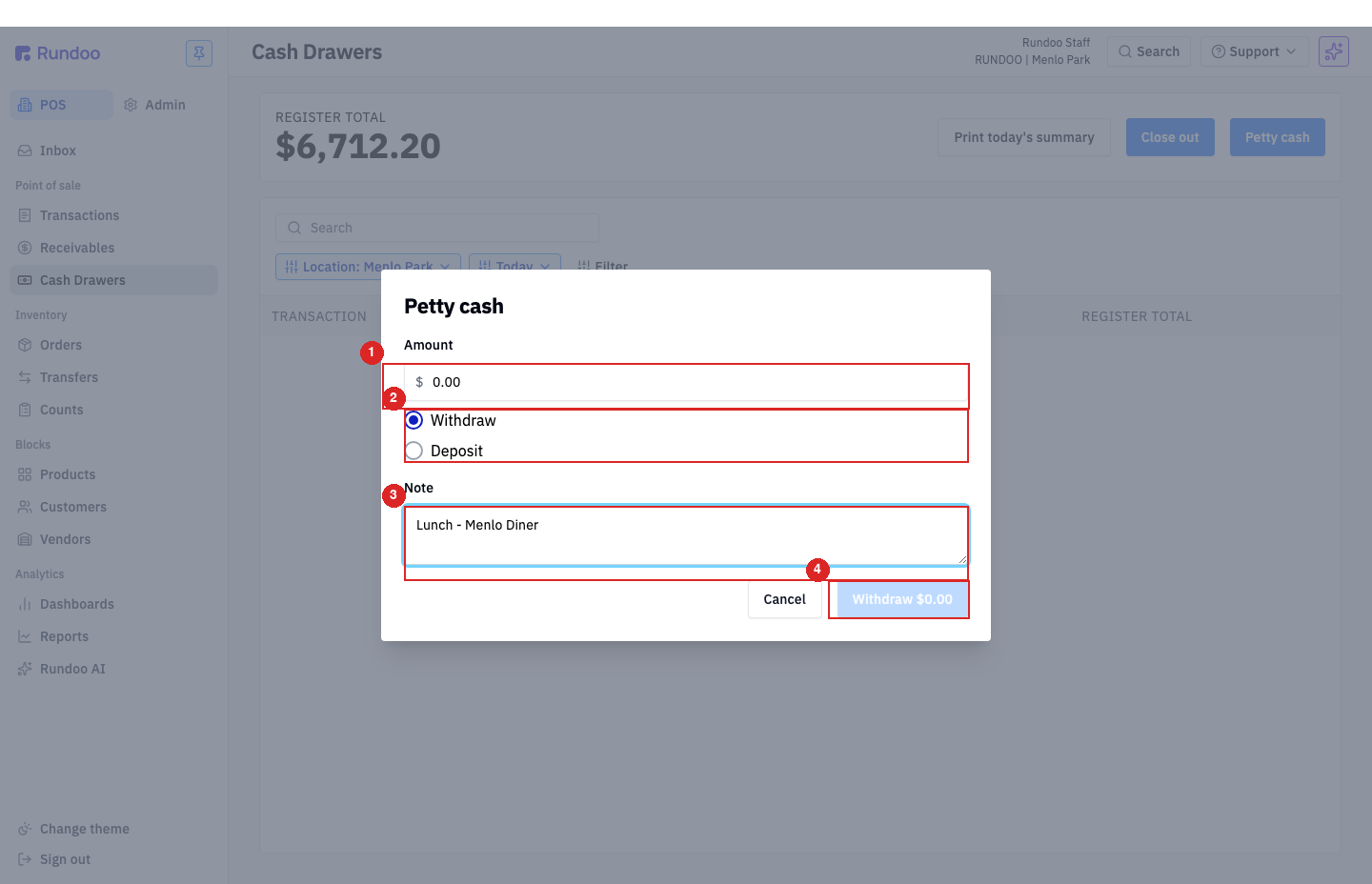
Click the button at the bottom. It mirrors what you picked, so it reads Withdraw $20.00 or Deposit $100.00 with your amount right in the label. Rundoo updates the REGISTER TOTAL on the spot. No surprises at close.
Click Close out. A window walks you through the drawer denomination by denomination, from $100 bills all the way down to $0.01. Enter the quantity you counted for each row and Rundoo does the multiplication for you.
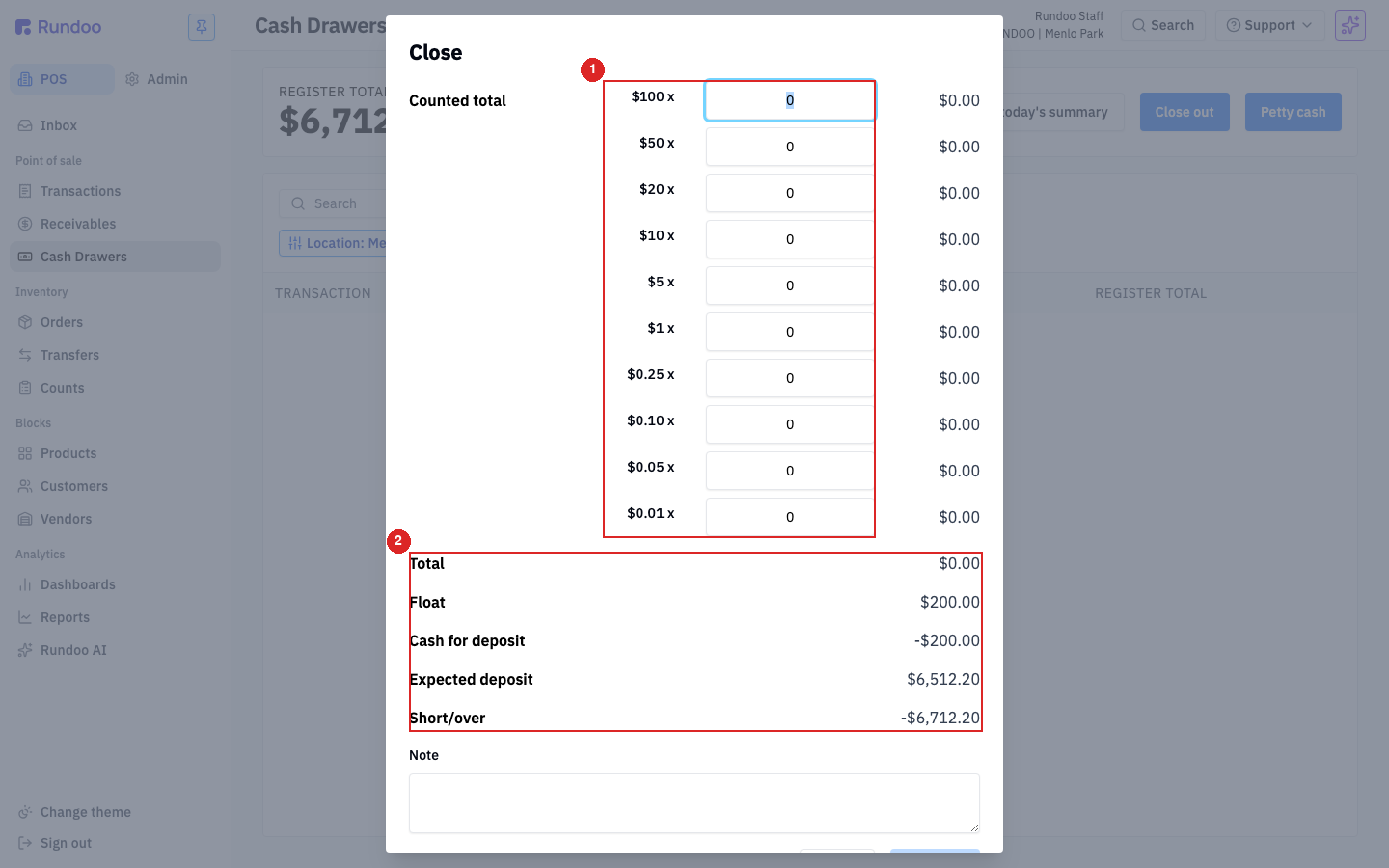
Down below the count, Rundoo lays it out for you: Total is everything you counted. It subtracts your Float (what stays overnight) to get Cash for deposit, the amount you'd drop at the bank. It compares that to the Expected deposit it calculated from the day's activity, and the difference is your Short/over. Zero means you balanced. Negative is short, positive is over.
A small variance is normal in a busy shop. If you're short or over by a bit, drop a line in the Note saying what you think happened, like "Possible change miscount on a cash sale." Then click Close out at the bottom. That locks in the day's numbers and resets the drawer to your float for tomorrow.
The one that trips people up: a cash refund drops you below float
Say you gave a cash refund today and the drawer dipped below your float. Rundoo won't let you close out. It tells you the total is less than your float, and it won't reach back into yesterday's deposit to cover the gap.
The fix is a tool you already know. Click Petty cash, switch the toggle to Deposit, and add enough to bring the drawer back up to your float. Then run Close out like normal and it goes right through.
Pro tip: the pennies shortcut
In a hurry and you trust the count? Skip the per-denomination rows. Count your cash, then type the whole amount as pennies into the $0.01 row. $487.32 in the drawer becomes 48732, and Rundoo multiplies it back into the Total. Same answer, one input.
Where
POS → Cash Drawers
REGISTER TOTAL is what Rundoo expects right now.
Petty cash
Amount, Withdraw/Deposit, Note
Log every non-sale cash move so the drawer stays in sync.
Close out
Total − Float = Cash for deposit
Short/over is that versus the Expected deposit.
Do it
Every single day
Daily close-outs keep the books flowing clean to accounting.
Good to know