
Rundocs › Admin & Settings
Cash rounding
Last updated 2026-10-12
Yes, Rundoo can round each cash sale to the nearest nickel (five cents), rounding up, down, or to whichever nickel is closest, set per location. Cards, checks, and charge accounts always ring to the exact cent, and every rounding adjustment is tracked in its own account.
In the Admin mode, open Locations in the left sidebar, click into a store, and scroll down to Cash rounding on the General tab.
💡 Why this exists. The US Mint struck its last penny in 2025, so banks are handing out fewer of them and making exact change at the counter keeps getting harder. Cash rounding lets you land every cash total on a nickel without touching your prices.
Turning on cash rounding
Cash rounding is set per location, so if you run five stores you turn it on in each one.
- In Admin › Locations, click the store's row to open its detail page. You land on the General tab.
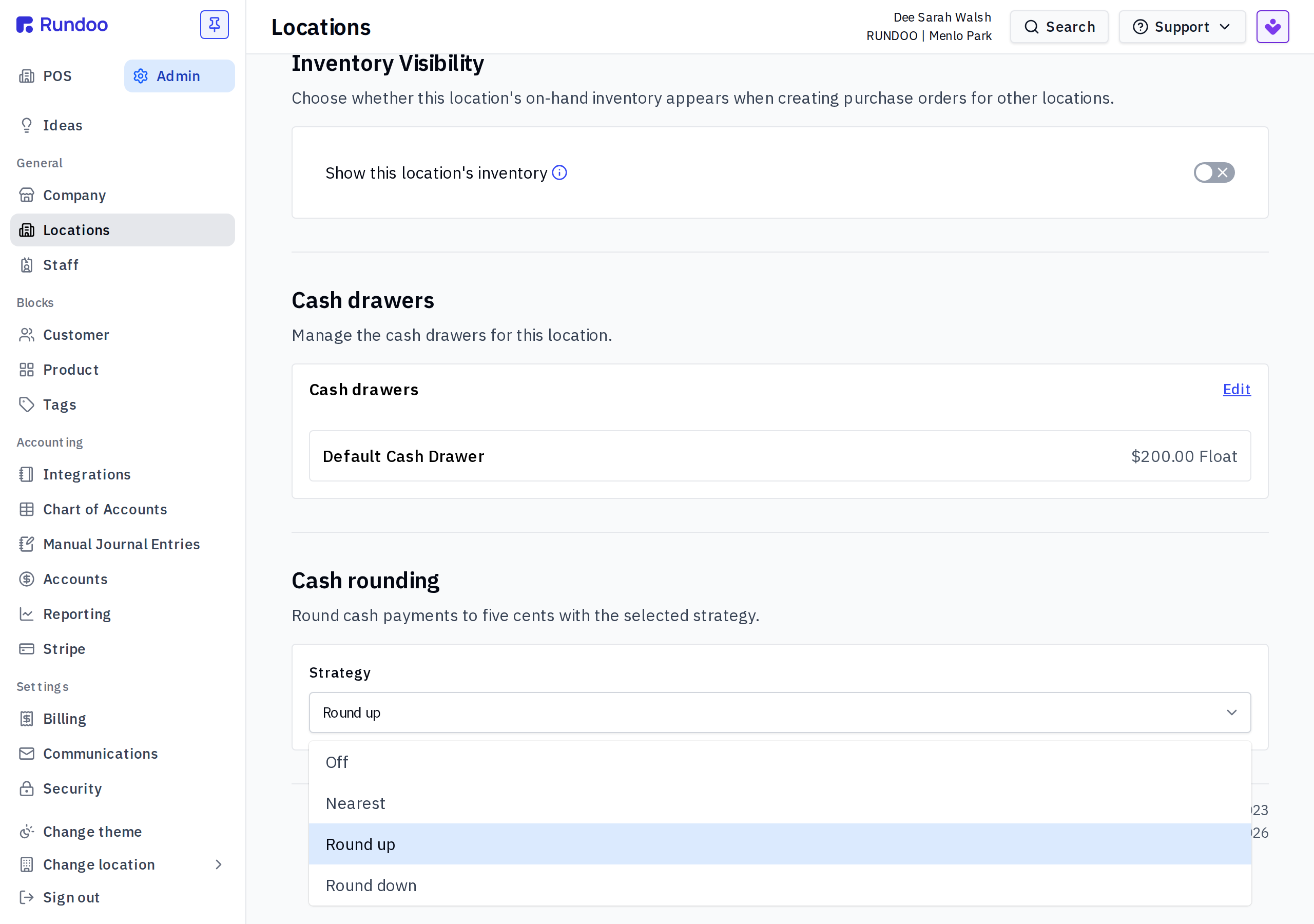
- Scroll down to the Cash rounding section ("Round cash payments to five cents with the selected strategy").
- Open the Strategy dropdown. It starts on Off. Pick how this store should round. That is the whole setup, there is nothing to save separately.
The three strategies
The Strategy dropdown has four choices. Pick the one that matches how you already handle change at the counter:
- Off — no rounding. Cash totals ring to the exact cent, same as every other tender.
- Nearest — rounds to whichever nickel is closer, up or down.
- Round up — always moves the cash total up to the next nickel.
- Round down — always drops the cash total to the lower nickel.
What happens at the register
The sale total always shows in full, down to the penny, no matter which strategy you picked. Nothing rounds while you are building the cart.
When the customer pays and you choose Cash, a Cash Rounding line appears above the total showing the adjustment, and the total rounds to the nearest nickel for that store's strategy. A $152.01 sale lands at $152.00 on Nearest or Round down, and at $152.05 on Round up.
Only cash rounds. The rounding line only appears when the tender is cash. Cards, checks, and charge-account sales always ring to the exact cent, even at a store with cash rounding turned on.
Your sales tax never changes. Tax is figured on the exact, pre-round subtotal, so rounding the cash total up or down never changes the tax you collect.
Where rounding shows in your books
Rundoo books every bit of rounding automatically to its own Cash Rounding control account, so your drawer reconciles with no phantom over or short. To review it, go to Reporting › General ledger and filter to the Cash Rounding account: round up posts a credit, round down posts a debit, and nearest can go either way. Click any transaction ID to open the sale, or open its totals breakdown to see the rounding line again. It all flows through to QuickBooks automatically, so there is nothing to track by hand.
At a glance
| What rounds | Cash only. Cards, checks, and charge accounts stay exact. |
| Rounds to | The nearest $0.05 (the next, lower, or closest nickel, depending on your strategy). |
| Where to set it | Admin › Locations › [store] › General › Cash rounding. Per location, a one-time setup. |
| Where it posts | A Cash Rounding control account in the general ledger, flowing through to QuickBooks. |