
Rundocs › Getting Started
E-commerce
Last updated 2026-10-09
E-commerce lets your customers browse your catalog and place orders online, from a web store and the Rundoo customer mobile app, then pick the order up in your store.
In the Admin mode, open the Company tab in the left sidebar and scroll to the E-commerce section. That's where you switch it on and point each location at a printer for the orders that come in.
Turning on e-commerce
Flip Enable e-commerce on. The subtext says it all, this one toggle powers both channels customers shop from, the Rundoo Customer Mobile App and the Web Store. Once it's on, the link next to the toggle (yourstore.rundoo.store) is your live web store address, the one you'd share with customers or put on your website.
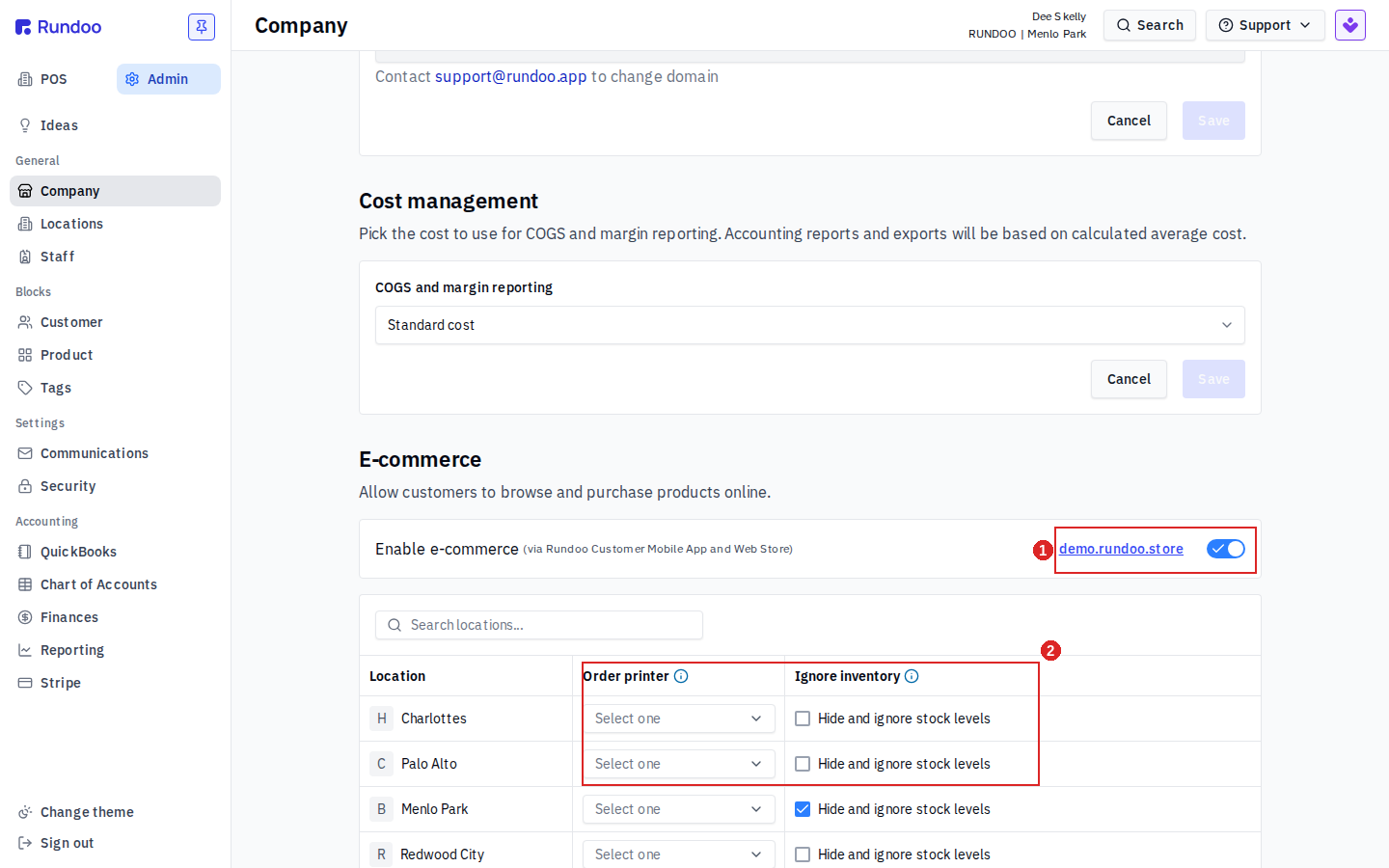
Below the toggle is a per-location table with two settings worth setting before you go live:
- Order printer. Pick which printer at each location prints an incoming online order, so the counter knows to pull and stage it. Leave it on
Select oneand orders still land in Rundoo, they just won't auto-print. - Ignore inventory. Check
Hide and ignore stock levelsfor a location to let customers order regardless of what's on hand there, and to hide the on-hand count from the storefront. Leave it unchecked and the web store shows stock (9 in stock,Out of stock) and blocks ordering what you're out of.
Already had the mobile shop on? Stores that were using mobile e-commerce before this launched get the web store automatically, nothing to re-enable. If a customer says their shop view is blank, first confirm Enable e-commerce is on here for your store.
What your customers can do
Your web store opens to a searchable product grid. Shoppers filter by Department, Class, and Fineline down the left, narrow to In stock, sort, and add items to a Cart with the + on each product card. Every card shows the price and, unless you've hidden it, the stock count.
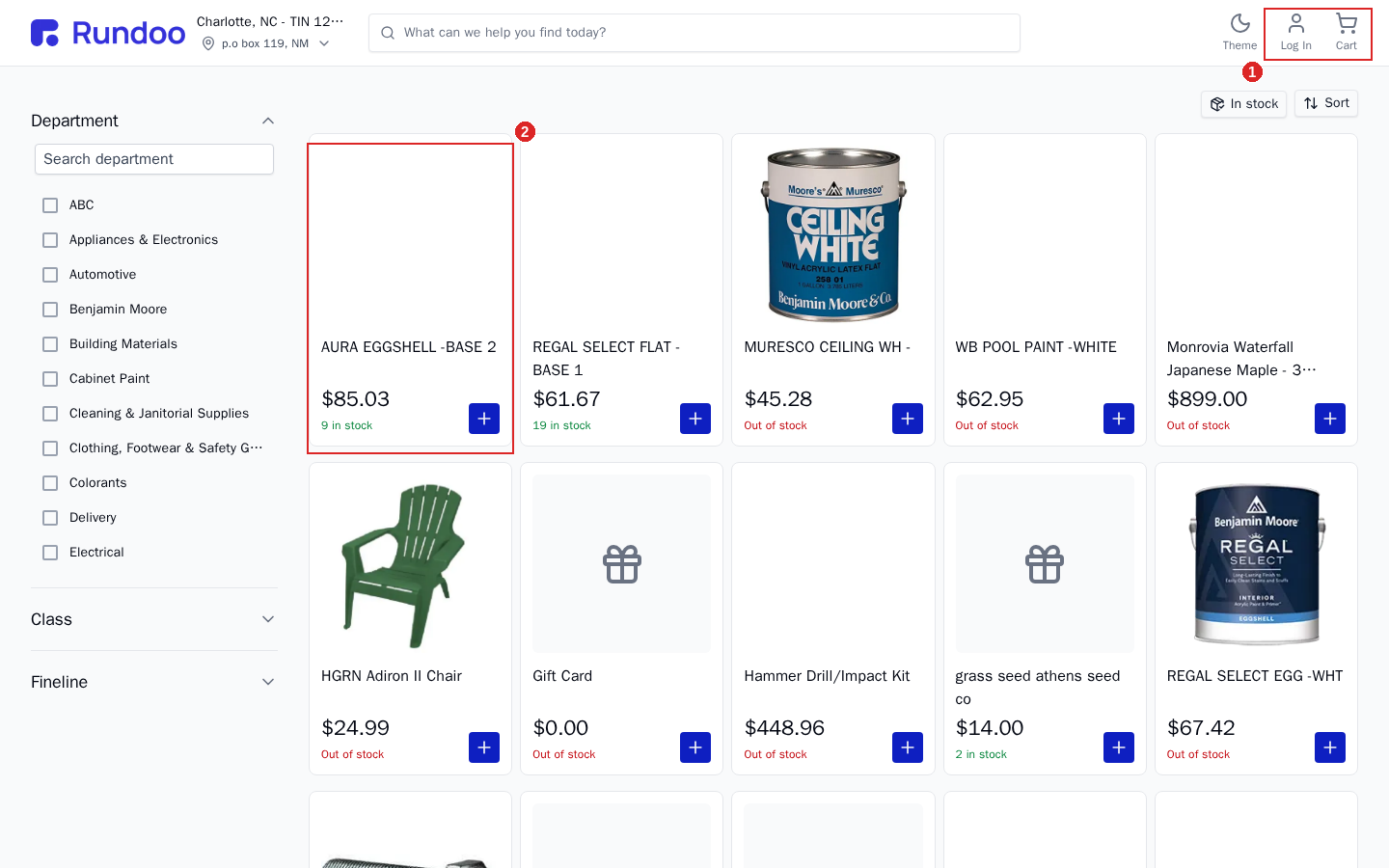
Pricing follows who's shopping:
- No account. A walk-up shopper who isn't signed in sees your retail prices. This is how a first-time customer browses paint chips and orders color samples without any setup.
- Signed in. A charge or contract customer taps Log In and shops under their own account, so their account pricing carries over the same way it does at your counter.
Customers pay by card at checkout, the same card fields as any online store (see Stripe for how card payments are wired up). Orders flow straight into Rundoo as sales.
Paying a bill on the web store
House-account customers can also pay their bill on the web store, not just shop it. A signed-in charge customer sees their balance and invoice detail and pays you from the web, the same thing the customer mobile app has always done, now on a desktop browser too (this went live October 7, 2026). They can pay their statement balance, full account balance, or specific invoices, by card or bank account. Bill payment is often a bookkeeper's desktop job, so this meets them where that work happens.
The bill-pay page is https://{yourstore}.rundoo.store/account/billing. A store can point the "Pay my bill" button on its own website straight at that link so customers go to bill pay and skip the catalog. Full flow (what the customer sees) is in Bill payments → Paying a bill online or in the customer app.
Want online bill pay but not an online catalog? Web bill pay rides the same Enable e-commerce toggle as the storefront, so turning it on for the bill-pay page also exposes your eligible items for online ordering on both the web store and the customer app. There's no one-click "bill-pay-only" storefront today. The only way to keep items off the store is the per-product Disable for e-commerce flag (set on each item, see Products). Deep-linking customers to /account/billing sends them straight to bill pay, but the catalog is still reachable.
Pickup in store, not shipping
Online orders are buy online, pick up in store. The customer places and pays for the order online, then collects it at your counter, so it's the same as any other sale once it lands in Rundoo.
Rundoo doesn't ship online orders. There's no shipping calculation at checkout and no parcel-carrier integration (ShipStation and the like). If a customer needs the goods delivered rather than picked up, that's handled off the web store, not as part of online checkout.
Limitations to know, especially for paint stores
A few things the web store doesn't do today. Worth knowing before you point paint customers at it:
-
It doesn't pick the paint base for a tinted color. A tintable product ordered online doesn't carry the right base for the color the customer wants, so a tint order placed on the web isn't ready to pour the way a counter order is. For now, tinted-paint orders are better handled at the counter or confirmed by phone.
-
A customer can cancel an online order after it's placed. If the store has already tinted the product for that order, the paint can't be un-tinted, so the store eats the cost. Watch new online tint orders before you mix them.
-
There are no product groupings. The storefront is a flat, filterable grid (Department, Class, Fineline), with no curated groups or collections, so a large catalog is harder to browse online than at the counter.
These are known gaps, not settings you can change. If they're blockers for how your store sells paint online, let your implementation manager know.