
Rundocs › Integrations
Contractor Rewards
Last updated 2026-08-27
Contractor Rewards is a Benjamin Moore program that Rundoo reports contractor sales into. This page covers how to set it up and run it in Rundoo: tag a customer with a PAX ID, ring up a sale, and Rundoo submits the invoice to Benjamin Moore overnight. What the program is and what contractors get from it come from your Benjamin Moore rep.
In the Admin mode, open the Company tab in the left sidebar. The Benjamin Moore offers section is where you enter your bonus code and wire up automatic submission.
What Rundoo does (and doesn't) do here
Contractor Rewards is run by Benjamin Moore, not Rundoo. Rundoo's role is to identify which contractor bought what and submit those sales to Benjamin Moore each night. The point balances, the rewards, and the contractor-facing portal all live on Benjamin Moore's side, so questions about the program itself go to your BM rep.
💡 Don't confuse Contractor Rewards with Rundoo's built-in Loyalty points. Loyalty points is Rundoo's own in-app dollar-based points display for contractors. Contractor Rewards is a separate Benjamin Moore program with its own portal and its own points. The two run independently, a contractor can be in one, both, or neither.
Before you turn it on
Contractor Rewards is usually wired up by the Rundoo team during go-live, because the pieces you need come from Benjamin Moore:
-
A Contractor Rewards bonus code. A code Benjamin Moore assigns to your store. Contractors use it when signing up so their points route to you.
-
A Benjamin Moore outlet number on your locations. A per-location BM identifier, set on each location record (see Turning it on in Rundoo). This is what actually enables auto-submission, and it's easy to miss because it lives in a different place than everything else here.
-
PAX IDs for your existing contractors. Benjamin Moore ships a file of PAX IDs (one per contractor enrolled under your store) that Rundoo loads onto the matching customer records.
If your store isn't already enrolled, your Benjamin Moore Territory Representative or the Contractor Rewards Group at Benjamin Moore kicks off enrollment. Once approved, Benjamin Moore sends the bonus code to Rundoo for setup.
PAX IDs and outlet numbers are different fields solving different halves of the same job. The PAX ID is per customer and identifies which contractor a sale belongs to. The outlet number is per location and identifies your store to Benjamin Moore. Loading PAX IDs does not switch submission on; the outlet number does. A store can have every contractor's PAX ID loaded and still not be submitting a thing because no location has an outlet number.
Turning it on in Rundoo
Two settings in two different places have to both be in place before Contractor Rewards submits anything.
1. The bonus code and the toggle live together. In the Admin mode, open the Company tab, then scroll to the Benjamin Moore offers section. Enter the code Benjamin Moore gave you in Contractor rewards bonus code and turn on the Allow customers to automatically submit sales for Contractor Rewards toggle so nightly submission runs. Click Save in the section footer to commit.
-
Contractor rewards bonus codeis where the code from Benjamin Moore goes. -
Allow customers to automatically submit sales for Contractor Rewardsis the nightly-send toggle. Leaving it on is how points actually land; flipping it off pauses submission without deleting the code.
2. A Benjamin Moore outlet number on each location. In the Admin mode, open the Locations tab, click into a location, and go to its Integrations tab. Enter your store's outlet number in the Benjamin Moore outlet number field (the help text there reads "The Benjamin Moore outlet number is used for integrations like CCP"). Do this for every active location, not just one.
The auto-submit toggle stays greyed out until both halves are in place. The Allow customers to automatically submit sales for Contractor Rewards toggle is disabled until your store has a Contractor rewards bonus code and at least one active location has a Benjamin Moore outlet number. If the toggle won't switch on, a missing outlet number is the usual reason, not the bonus code and not the PAX IDs. Set the outlet number on the location's Integrations tab first, then come back and the toggle turns on.
Set the outlet number on every location, not just one. A location with no outlet number is silently skipped in the nightly submission, so its sales never reach Benjamin Moore even while the toggle reads on. If one store's contractors are missing points, check that that location has an outlet number, not just the location you first set up.
⚠️ CCP & RSD are separate Benjamin Moore programs that also run out of the Benjamin Moore offers section, but the CCP submission cadence isn't a self-serve control anymore, Rundoo Support sets it (Monthly by default). The Contractor Rewards wiring here is specifically the
Contractor rewards bonus code, theAllow customers to automatically submit sales for Contractor Rewardstoggle, and the per-locationBenjamin Moore outlet number.
How a contractor signs up
A contractor has to enroll with Benjamin Moore before Rundoo can start sending their sales in. Enrollment runs through Benjamin Moore, but Rundoo gives you a one-click way to kick it off right from the register.
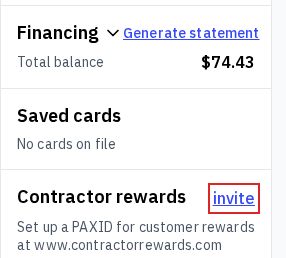
- Invite them from the cart. Attach the contractor to a sale in the POS mode. If they don't have a PAX ID yet, an invite link shows in the Contractor rewards box on their customer card in the left rail. Click it and Rundoo emails that customer the Benjamin Moore sign-up link, with an Invitation emailed confirmation.
-
The contractor enrolls with Benjamin Moore. They open the emailed link, fill out Benjamin Moore's form, and accept the program's terms on Benjamin Moore's side.
-
Benjamin Moore emails you their PAX ID. Once a week, the Contractor Rewards Group sends you a digest listing the contractors who signed up under your bonus code, each with a new PAX ID (think of it as their account number for the program).
-
You put that PAX ID on their Rundoo customer record. Drop it into the customer's
PaxIDfield (see the next section). From then on, that customer's qualifying Benjamin Moore sales submit to the program automatically each night.
💡 The invite link only shows once Contractor Rewards is set up. The invite link appears on a customer's card when your store has a
Contractor rewards bonus codeentered and the auto-submit toggle on (see Turning it on in Rundoo above), and the customer doesn't already have a PAX ID. The invite is emailed to the address on the customer record, so make sure they have one on file.⚠️ Inviting isn't instant enrollment. The invite link emails the sign-up link, it doesn't enroll the contractor on the spot. They still complete enrollment on Benjamin Moore's side, and their PAX ID comes back in Benjamin Moore's weekly digest (step 3), not right away. You still drop that PAX ID onto their record yourself before sales start submitting.
Tagging a contractor with their PAX ID
A contractor only earns points if their PAX ID is stored on their Rundoo customer record. When a contractor signs up under your bonus code, Benjamin Moore emails you their PAX ID (usually in the weekly digest from the Contractor Rewards Group), and you drop it onto the matching customer in Rundoo.
In the POS mode, open the Customers left tab, click into the customer, and go to the Settings top tab. Scroll to the Contractor rewards section near the bottom and paste the PAX ID into the PaxID field. Save to commit.
💡 PAX IDs are back-office plumbing. Contractors never see or need their PAX ID (they sign into Contractor Rewards with their email and see their points balance on Benjamin Moore's portal). The PAX ID is Rundoo's way of telling Benjamin Moore "this sale belongs to this contractor."
What contractors see
Contractors don't check their Contractor Rewards balance inside Rundoo, they use Benjamin Moore's Contractor Rewards portal at benjaminmoore.com. After they've verified their email, accepted the Terms & Conditions, and confirmed their status on Benjamin Moore's side, points from Rundoo-submitted sales typically land within 48 hours of nightly submission. Until those verification steps are done, points accrue but don't display.
On the Rundoo side, there's no contractor-facing Contractor Rewards surface at all, and no points-redemption tender in the cart. Redemption happens entirely in Benjamin Moore's portal, outside your POS.
What shows in Rundoo reports
Contractor Rewards doesn't get its own report in Rundoo. Nightly submission is a silent background pipe, Rundoo sends the invoice data to Benjamin Moore and trusts their system to tally points. There's no "rewards submitted" log, no "points earned" column on a sale, and no dashboard widget for your tenant's program health.
The two practical ways to answer "is this working":
-
Are you getting the weekly Benjamin Moore email? The Contractor Rewards Group sends a weekly email listing contractors who signed up with your bonus code. If it stops showing up, contractors probably aren't using your code. Check with RSOS@benjaminmoore.com or your BMC Territory Representative.
-
Are points landing on the contractor's portal? If a contractor reports missing points, first confirm their PAX ID is on their Rundoo customer record, then confirm the products they bought had correct Benjamin Moore UPCs, then confirm
Allow customers to automatically submit sales for Contractor Rewardsis still on.
⚠️ Submission failures retry quietly. If a PAX ID has a typo, is inactive on Benjamin Moore's side, or doesn't match a Rundoo customer, the Contractor Rewards Group at Benjamin Moore catches it on their end and either contacts your territory rep or reaches out to you directly. Fixes still happen in Rundoo, correct the PAX ID on the customer's Settings tab and future sales will submit clean.
Recommended Rundocs
-
Company details (the rest of the Company tab where the bonus code lives).
-
Locations (the Integrations tab on each location, where the
Benjamin Moore outlet numberlives). -
Customers (creating and editing customer records, including where the PaxID field lives).
-
Loyalty points, Rundoo's built-in loyalty feature, separate from the Benjamin Moore program.
-
Sales (ringing up sales that get submitted to Contractor Rewards).